
There will be a lot of reasons to scrape URLs from Google Search Results. But scraping google is against their terms and policies. So many tools fail to scrape the search results. But you can try paid tools but they tend to drop few results and some paid tools still need additional proxies to scrape the search results.
These are the few reasons that you might be scraping the search results for,
- To monitor how your website performs in Google for certain queries over a period of time
- And to see your indexed webpages in Google search results.
- Monitor your competition in organic search results.
- Build a URL list for certain keywords. This is useful if you, for example, need good relevant starting points when scraping web pages containing specific phrases
How to Scrape URLs from Google Search Results with Titles?
There are a lot of methods, premium tools, freemium tools, and python scripts available to scrape the indexed web pages in Google search results but there are two ways that you’ll learn which totally free and easy.
The first method is really simple and easy, it doesn’t even take much of your time like the second one.
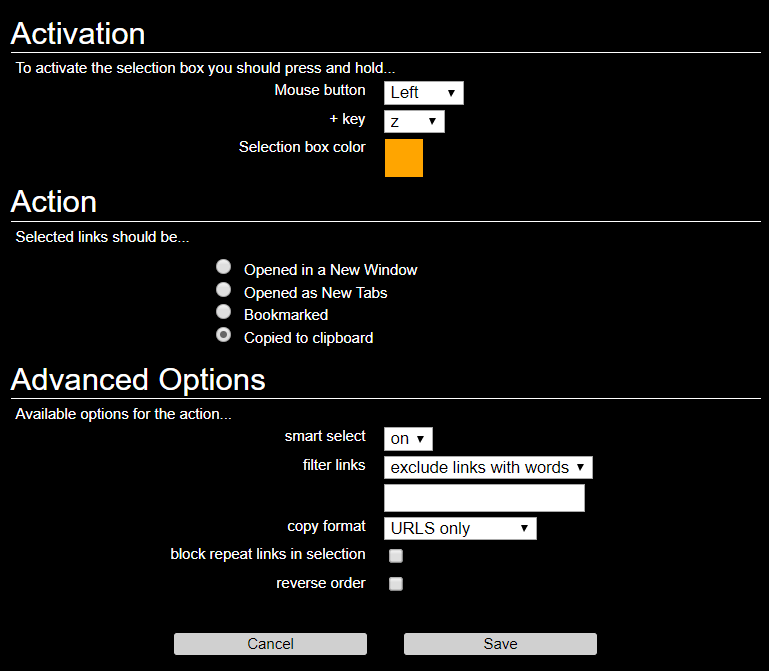
- Download the chrome extension linkclump.
- Go to the settings of the extension then configure the extension to copy Both text and links. You can even configure it to scrape both titles and URLs.
- Now head back to Google search Click Settings>Search Settings and change the results per page to 100 then click save and you will be prompted with captcha verification.
- Search for the keyword you want to scrape the search results on Google.
- Then hold the “Z” key and “left-click” on the mouse as per your settings in the link clump. The drag to the bottom of the search result.
- Then open a Google Sheet or Excel and paste it.
- Repeat the same step for the next pages if you want to scrape more than 100 search results.
This will provide both the title and URLs on two separate columns. This method is super easy to scrape URLs from google search results or from any other search engine.
The second method is also with the help of a chrome extension web scraper. While this is quite complicated while setting up but it will be really helpful if you scrape regularly. So you can save time by using the same template all the time.

- Install the extenstion from the link above.
- Search for the keyword you want to scrape the search results on Google.
- Press F12 to open developer options and click the “Web Scraper” in the menu bar.
- Click “create new sitemap” and provide a name for the sitemap.
- Copy the URL from the google search engine and paste it on the start URL and hit save.
- Enter a name of the ID and select the type as text.
- Select the checkbox the mutiple below and then choose “select” in selector.
- Now head back to the Google search results page and select the titles by holding the shift button. After few clicks it will automatically find the other title elements in the search results.
- Then come back again to the developer console and click “add new selector” to create a new selector for links.
- And repeat the same step as 6, 7, 8 except choosing the type as “Link”.
- Now click edit in the “Title” Id in the webscraper and change the parent selector as “link”.
- Now head back to the webscraper and click the data preview in the top right and copy it and paste it to the sheets and delete the unwanted columns.
Now you can search for any of your keywords on the search engine this sitemap will scrape the URLs and titles in the google search results.
You can also use search operators to make a site audit.
Ex. site:justseothings.com
In case, you need to get only the https pages you can fine-tune the search with the https or you can even do that with a specified path
Ex. site:https://justseothings.com or Ex. site:https:justseothings.com/seo
You can try multiple combinations according to your requirements using the search operators but to get most of your indexed pages in the search results I recommend going with site:yourdomain.com, hit search and before going to the next step visit the last page, click “repeat the search with the omitted results included”.
With the help of these two methods, you can scrape the google search results for optimizing and improving your search presence. If you are doing an SEO audit make sure you find the duplicate content and URLs.

Hi sir
i need guest post on your site tell me best price https://justseothings.com
waiting your reply
Thanks
Hi Emma, thanks for your interest. I have no idea of the guest blog as of now. I appreciate your effort of reaching out.